
30 najboljših Stray modov: CJ, Garfield, grafika, način prve osebe in še več
 Vladyslav Shamshurov
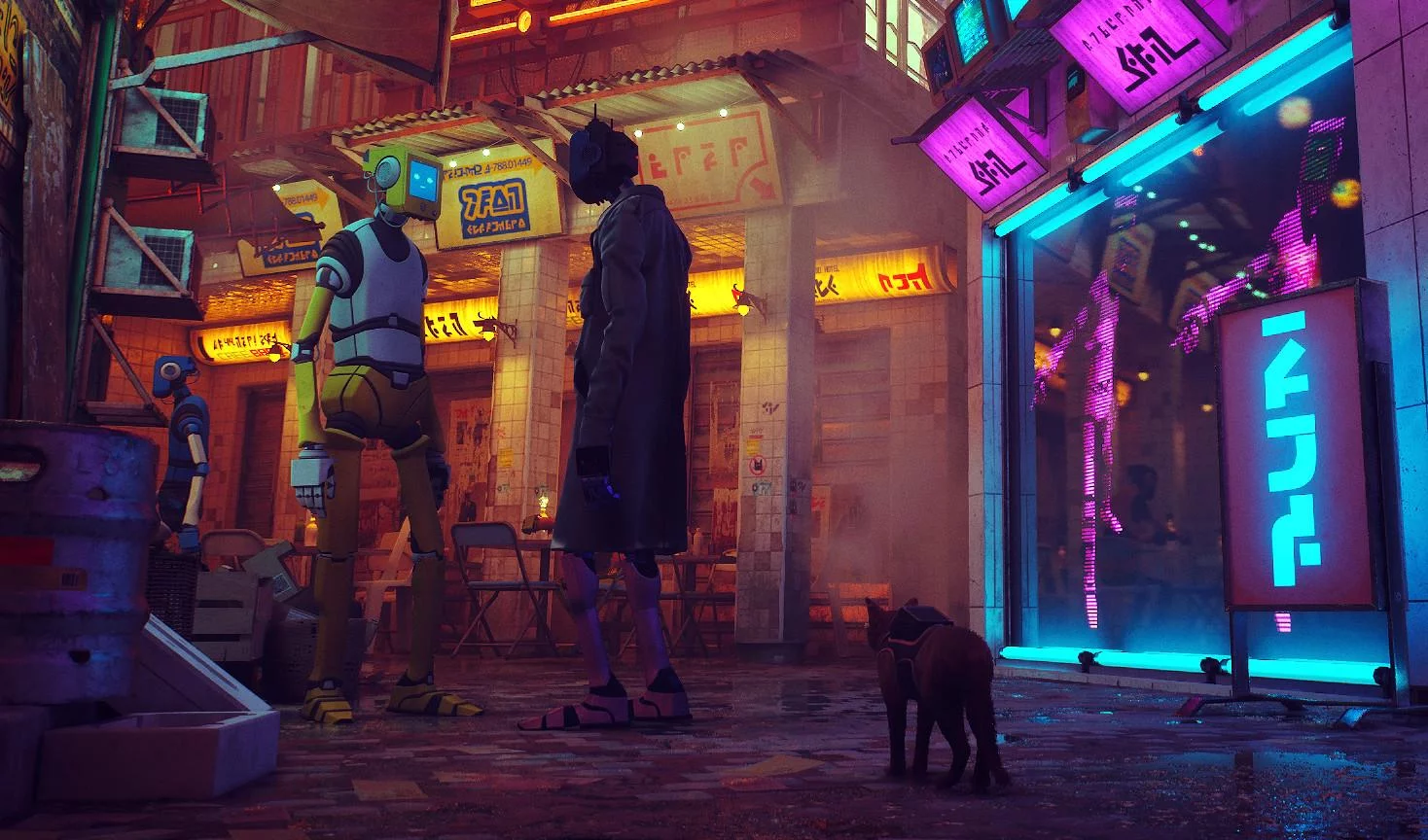
Mods za Stray lahko resnično spremenijo igro: omogočajo vam izbiro druge pasme mačke, izboljšanje grafike, dodajanje nenavadnih kož, omogočanje kooperacije in celo preoblikovanje znanega igranja. V tem članku smo zbrali najbolj zanimive modifikacije za Stray, jih razvrstili po kategorijah in razložili, kaj vsaka od njih počne. Tako lahko hitro izberete grafični mod, novo mačjo kožo ali nenavadno spremembo igranja.
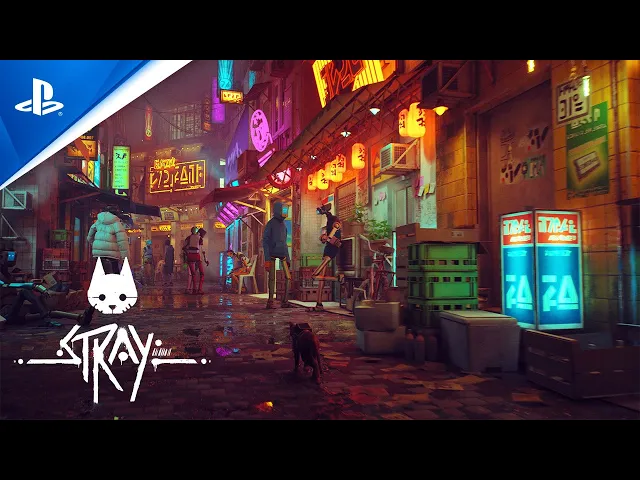
Če imate radi zgodbe, kot je ta, si oglejte našo seznam iger, podobnih Stray.
Kako namestiti modne dodatke za Stray
Večina modifikacij za Stray se namesti ročno preko mape Paks v imeniku igre. Pred namestitvijo se prepričajte, da ste preverili opis specifičnega moda: grafični prednastavitve, foto način, trenerji in modi, ki temeljijo na Unreal ModLoader, lahko zahtevajo dodatne korake.
- Prenesite arhiv z modifikacijo in ga razpakirajte.
- Odprite mapo Paks, ki se nahaja na C:\Program Files (x86)\Steam\steamapps\common\Stray\Hk_project\Content\Paks.
- Kopirajte datoteko moda v to mapo.
- Zaženite igro.
Da odstranite modifikacijo, preprosto izbrišite ustrezno datoteko iz mape Paks. Če je mod nameščen drugače, bomo to omenili v opisu.
Grafični modi za Stray: Kako izboljšati vizualne učinke, osvetlitev in atmosfero
Ta oddelek vključuje modifikacije, ki naredijo Stray svetlejši, bolj kontrasten in bolj atmosferičen. Modi, kot so ti, izboljšajo vizualni občutek cyberpunk mesta, naredijo igro bolj potopno in vam pomagajo videti znane lokacije na nov način.
Preprost realističen 3D za Stray: fotorealistični vizualni učinki

Ta mod izboljša grafiko igre z uporabo ReShade filtrov. Po namestitvi postane osvetlitev svetlejša, sence pa izgledajo bolj realistično. Kakovost post-obdelovalnih učinkov je prav tako opazno izboljšana.
Koraki za namestitev:
- Prenesite in razpakirajte arhiv.
- Postavite ga v mapo z izvršno datoteko Stray-Win64-Shipping.exe. Privzeto se nahaja na C:\Program Files (x86)\Steam\steamapps\common\Stray\Hk_project\Binaries\Win64.
- Zaženite igro.
Če ste prej namestili drug mod, ki temelji na ReShade, se prepričajte, da najprej odstranite staro prednastavitev.
Real Depth 3D ReShade: Boljša grafika in globina slike

Real Depth 3D ReShade pomaga, da slika postane bogatejša in doda občutek globine. Po namestitvi se lahko nekatere teksture, kot so zelene liste, nepravilno prikažejo. To ni kritična težava, vendar je bolje, da o tem vnaprej veste.
Način namestitve je enak kot pri prejšnjem modu.
Gameplay Mods for Stray: Co-op, First-Person Mode, and New Features
Te spremembe so najbolj primerne za igralce, ki so že končali Stray in želijo novo izkušnjo. Način prve osebe spremeni občutek mesta in potovanje mačke naredi bolj osebno, medtem ko kooperativni mod omogoča igranje skozi zgodbo s prijateljem na istem zaslonu. Če uživate v kooperativnih prehodih, si oglejte naš seznam najboljših kooperativnih iger na PC, PS4, PS5 in Xbox.
Razdeljen zaslon: Lokalni ko-op na razdeljenem zaslonu

Ta oddelek vsebuje podrobna navodila za namestitev modifikacije. Sledite vsem spodnjim korakom, da zaženete kooperativni način.
Sledite temu povezavi do modifikacije Splitscreen na Nexus Mods. Da prenesete izboljšavo, se morate prijaviti ali registrirati na spletnem mestu, sicer bo dostop do prenosa blokiran.
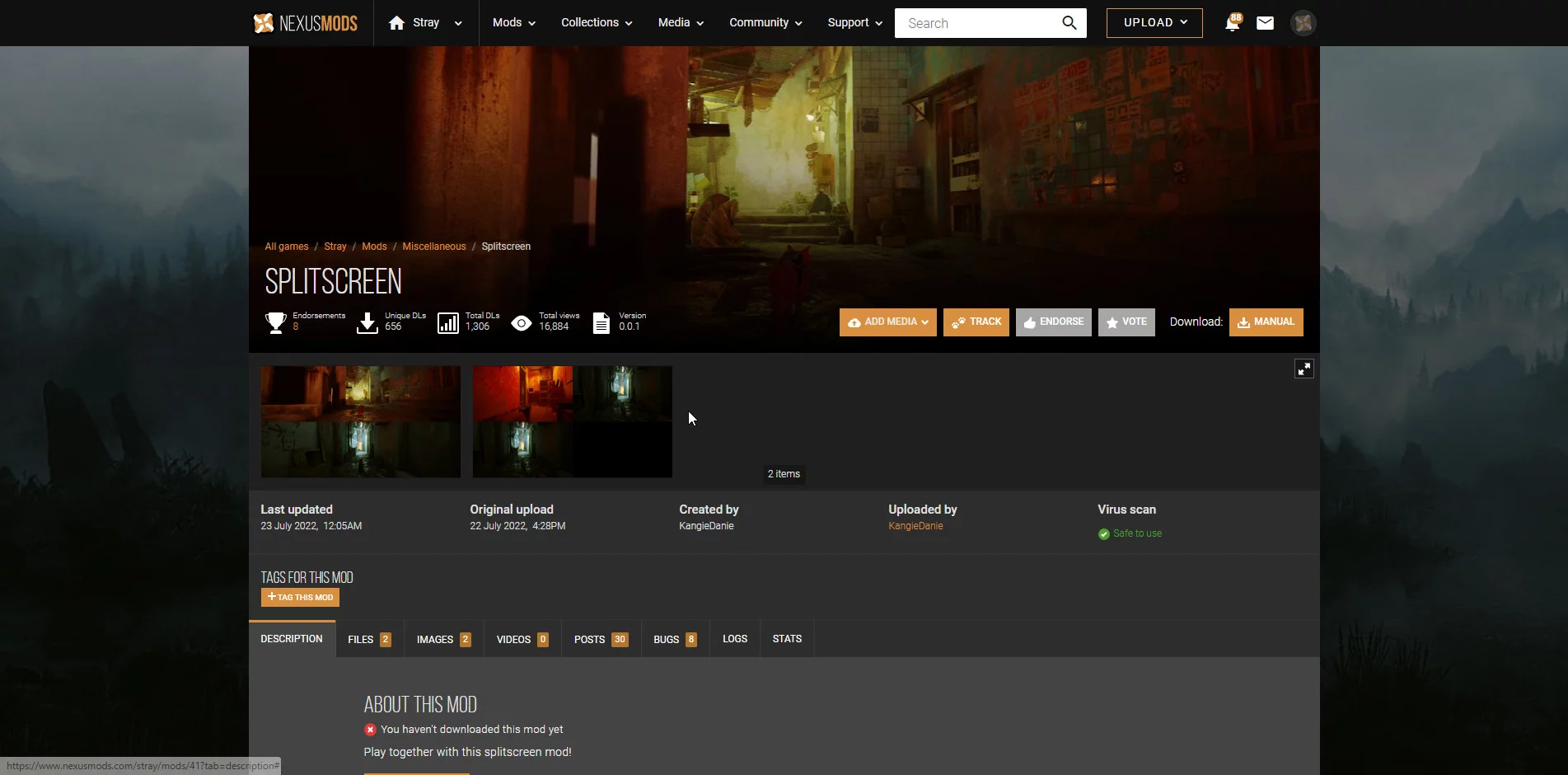
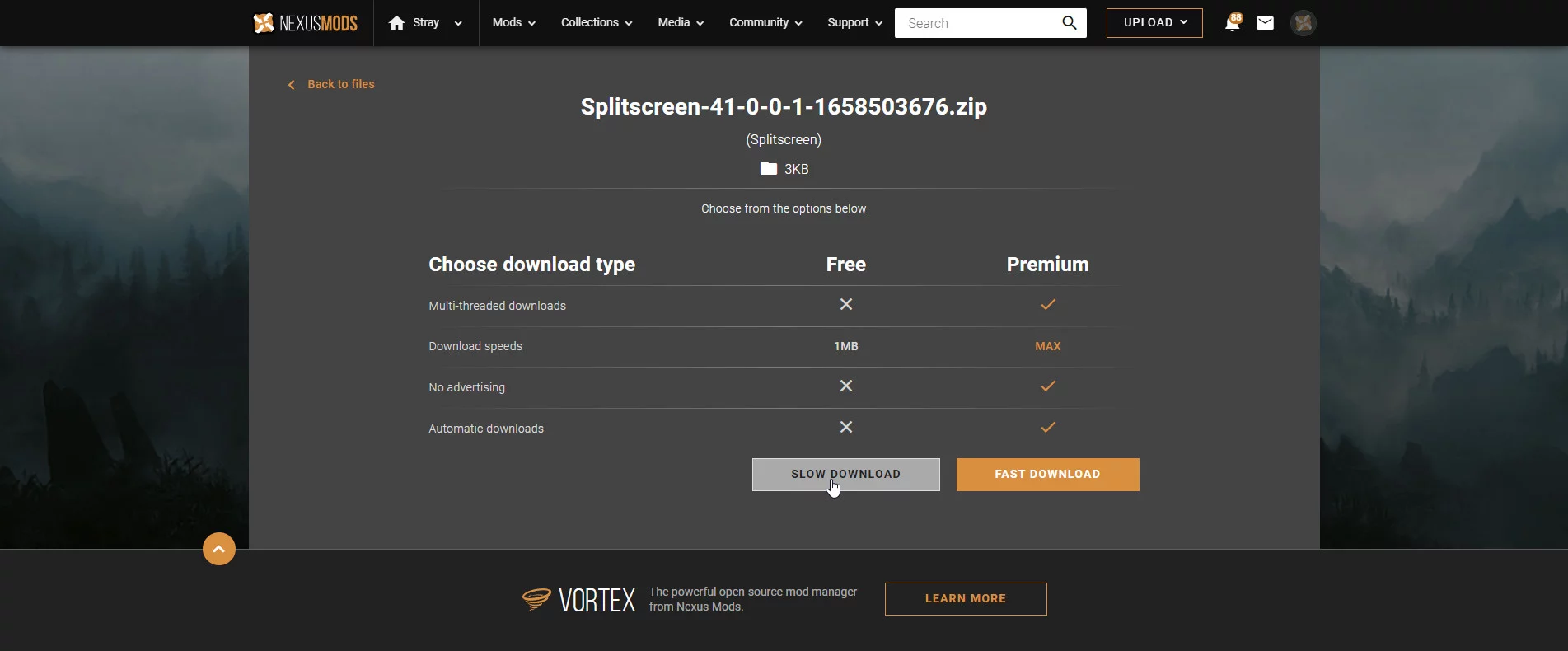
Kliknite na zavihek Datoteke in uporabite gumbe Ročni prenos enega za drugim v ustreznih oknih za datoteke Splitscreen in Splitscreen required config.
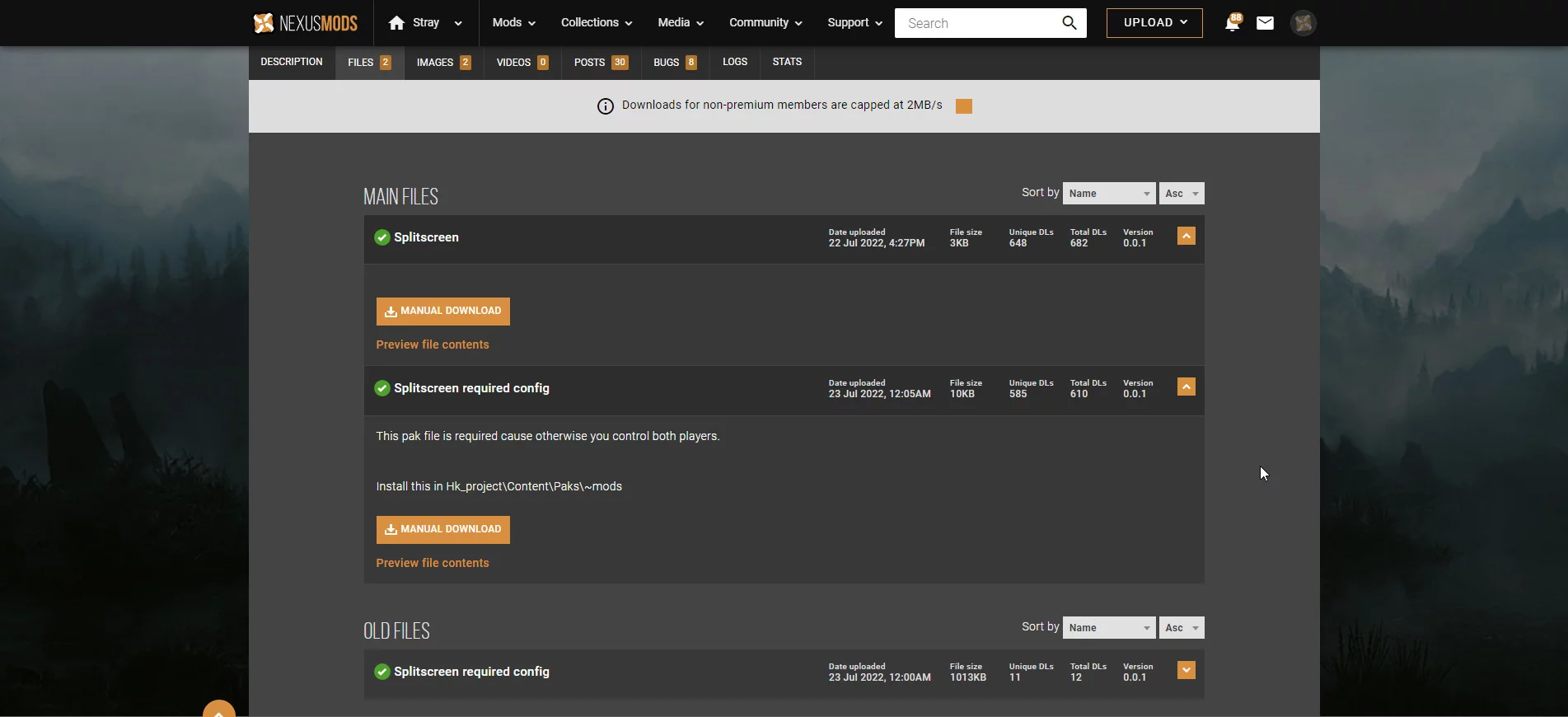
Na odprtih straneh uporabite gumb Počasen prenos za namestitev datotek. Ni vam treba kupiti premium ali uporabljati hitrega prenosa. Obe datoteki sta zelo majhni, okoli 13 KB, in se bosta hitro prenesli tudi pri nizki hitrosti.
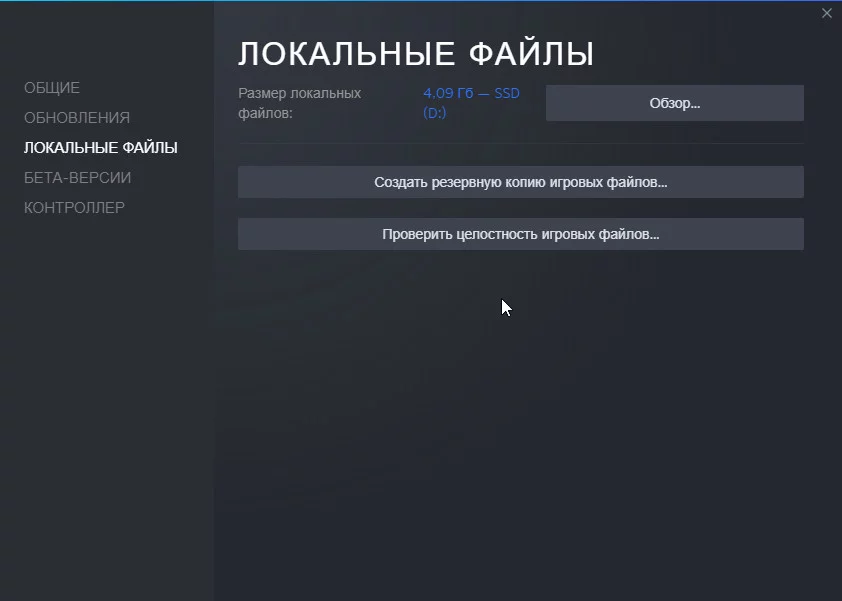
Po prenosu razpakirajte arhive in postavite prenesene datoteke v glavno mapo igre. Uporabniki Steama lahko odprejo odjemalca in najdejo Stray na seznamu kupljenih aplikacij. Nato z desno miškino tipko kliknite nanjo, odprite Lastnosti, in v razdelku Lokalne datoteke kliknite Brskaj, da odprete pravilno mapo.
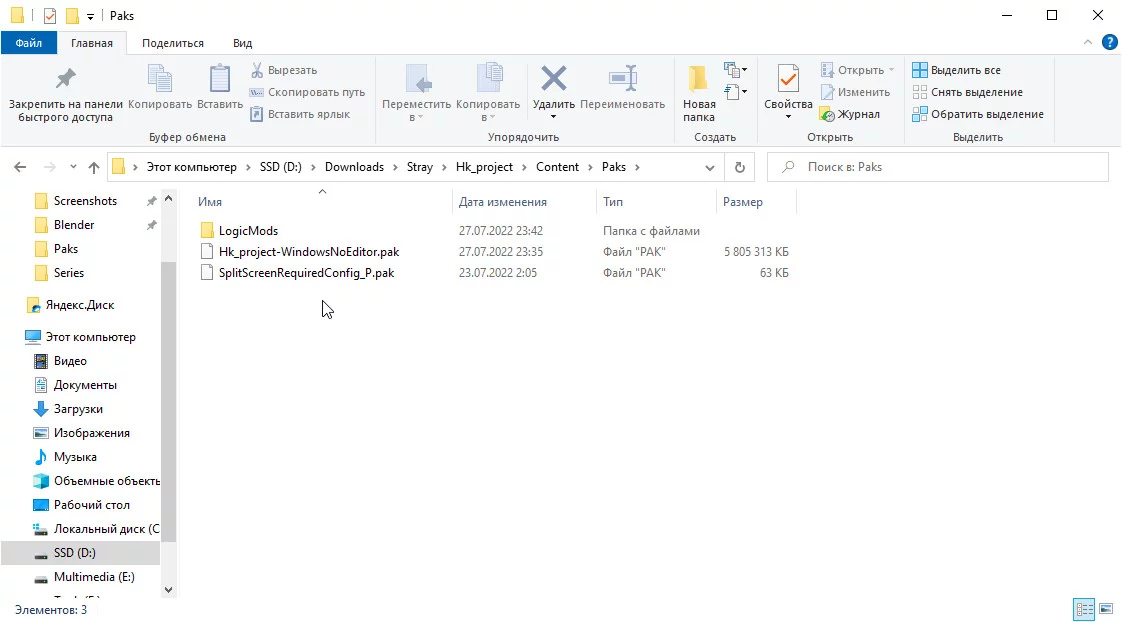
V imeniku datotek igre Stray najprej pojdite na Stray / Hk_project / Content / Paks in tam postavite datoteko SplitScreenRequiredConfig_P.pak.
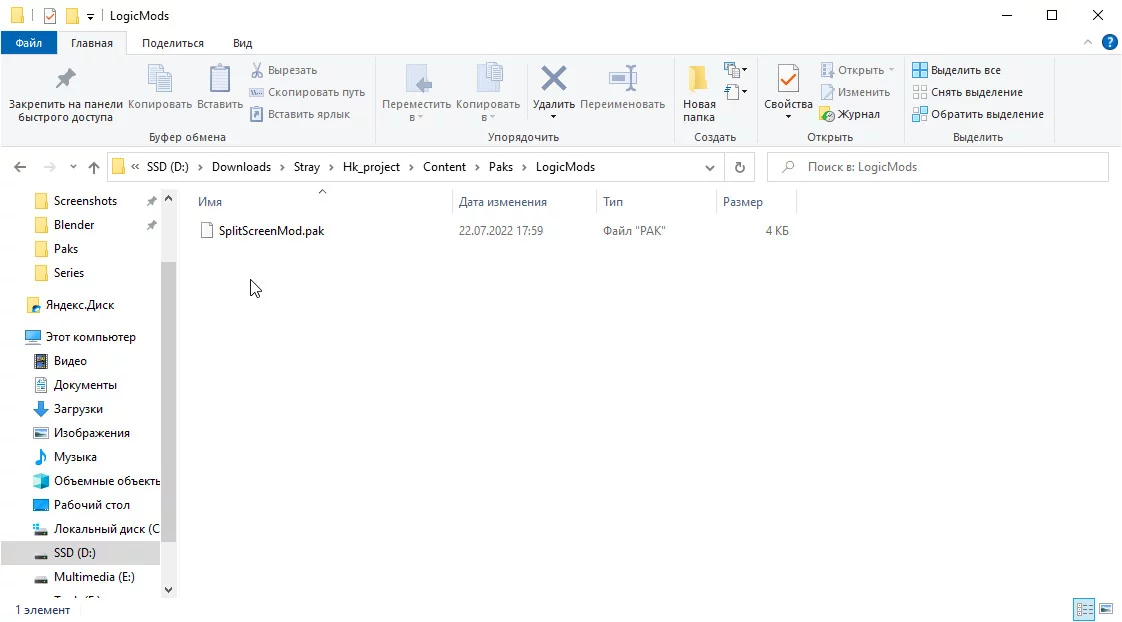
Na istem mestu ustvarite mapo LogicMods in jo odprite. V mapo LogicMods postavite datoteko SplitScreenMod.pak.
Sledite temu povezavi za samodejni prenos UnrealModLoader, nato razpakirajte datoteke na katero koli priročno mesto.
Odprite mapo UnrealModLoader in zaženite datoteko UnrealEngineModLauncher. Zaženite Stray.

V glavnem meniju pritisnite F9 na tipkovnici. Zaslon se bo razdelil za dva uporabnika: glavni prikaz se bo pojavil v zgornjem delu, medtem ko se bodo aktivni gumbi glavnega menija pojavili v spodnjem delu na popolnoma črni ozadju.
Pritiskanje F9 ponovno omogoča igralcu dodajanje več uporabnikov, vendar obstajajo nekatere omejitve in napake. Podrobne informacije o tem so navedene v naslednjem razdelku.
Omejitve in napake: Kako se izogniti težavam pri zagonu moda
Najprej upoštevajte, da razvijalec moda ni dokončal celotne igre v načinu razdeljenega zaslona, zato trenutno ni potrditve, da izboljšava deluje brez napak skozi celotno igro. Če naletite na napake, ponovno zaženite igro in naložite najnovejšo shranitev brez aktiviranja dodatnih uporabnikov.
Bodite pozorni na glavne podrobnosti o tem, kako deluje modifikacija razdeljenega zaslona:
- Dodatni uporabniki se aktivirajo s tipko F9 na tipkovnici.
- V kooperativnem načinu lahko le gostitelj seje vidi HUD, zato bodo morali drugi pridruženi uporabniki raziskovati svet igre brez njega.
- V redkih primerih lahko pride do težav pri premikanju na druge ravni: prijatelji, ki so se pridružili seji, se lahko zataknejo. Ponovno naložite shranitev in ponovno povežite druge uporabnike.
- Stray ni bil zasnovan za uporabo v razdeljenem zaslonu, zato se lahko občasno pojavijo vizualne napake.
- Dodajte več kot enega dodatnega igralca na lastno odgovornost: razvijalec ni potrdil stabilnega delovanja za tri ali več uporabnikov.
- Kamera lahko izgubi vidnost glavnega igralca. V tem primeru poskusite ponovno zagnati shranitev. Razvijalec moda je seznanjen s to težavo in jo bo kmalu poskušal odpraviti.
- Uporaba tipke F9 zunaj glavnega menija lahko povzroči usodne napake, ki vodijo do popolnega zrušenja igre. Zaprite Stray, ponovno zaženite UnrealEngineModLauncher in ponovno odprite igro.
Stray: Mod za prvo osebo. Pogled iz prve osebe

Ta mod vam omogoča, da svet vidite skozi oči mačke. Skočitev in premikanje po lokacijah v prvi osebi se zdi nenavadno, vendar lahko ponudi novo igralno izkušnjo.
Mod za foto način. Foto način

Stray nima vgrajenega foto načina. Ta težava se lahko reši z namenskim modom. Poleg zajemanja posnetkov zaslona mod omogoča tudi prilagajanje globinske ostrine, spreminjanje kota kamere in uporabo različnih barvnih filtrov.
Koraki za namestitev:
- Prenesi in namesti UnrealModLoader.
- Prenesi mod.
- Odpri mapo Paks, ki se nahaja na C:\Program Files (x86)\Steam\steamapps\common\Stray\Hk_project\Content\Paks.
- Ustvari imenik LogicMods znotraj nje.
- Premakni datoteko PhotoMode.pak v to mapo.
- Zaženi UnrealModLoader.
- Zaženi Stray.
Za zagon foto načina pritisnite F9.
Modi za zamenjavo modelov mačke in B-12 za Stray: nove kože
Ta odsek vključuje mode, ki spremenijo videz glavnega junaka Stray, robota B-12, in mačjega nahrbtnika. Z njimi lahko izberete drugačno barvo krzna, zamenjate model mačke, dodate svetleče oči, igrate kot lik iz drugega dela ali spremenite videz svojega spremljevalca.
Izbira iz legla. Sprememba barve mačje dlake

Ta modifikacija vam omogoča, da spremenite barvo dlake vašega puhastga junaka. Izbirate lahko med črno, belo in sivo barvo, pa tudi odtenki, značilnimi za siamsko mačko in tigerčka.
Emisivne mačje oči. Oči, ki svetijo v temi

Ta mod naredi oči vaše mačke izjemno svetle. Zaradi tega učinka glavni junak izgleda temnejši in bolj zlovešč, vendar bo ta vizualni slog verjetno imel svoje oboževalce.
Garfield: Risanka. Igraj kot Garfield

Garfield je verjetno znan iz risank ali stripov. Ta debeluhasti puhasti maček je že dolgo eden najbolj prepoznavnih komičnih mačk. Namestite ta mod, da igrate kot on.
Srečen kuža. Igraj kot ljubek pes

Če iz nekega razloga imate raje pse kot mačke, si oglejte to dodatno vsebino. Omogoča vam, da preigrate celotno igro kot ljubek črno-beli kuža.
Maček v čevljih

Ta mod spremeni glavnega junaka v Mačka v čevljih iz animiranih filmov DreamWorks. Pojavil se je v Shreku 2 in kasneje prejel dva samostojna animirana filma.
Sphynx mačka. Igraj kot kanadski Sphynx

Če si oboževalec brezdlakih mačk, ti bo ta dodatek verjetno všeč. Po namestitvi moda boš lahko igral kot roza Sphynx.
Kože za različne pasme mačk v Stray

Ta odsek vključuje prilagojene mačje kože, ki niso povezane s specifičnimi filmi, risankami ali igrami. Modifikacije, kot so te, so dobra izbira, če želiš preprosto spremeniti pasmo, barvo ali splošni videz glavnega junaka.
Nova oblačila za B12. Novi videzi za robota B-12

Ta modifikacija vam omogoča, da videz droida B-12 naredite bolj podroben. Poleg tega lahko izberete alternativne obleke za robota. Spremenijo barvo njegovega telesa in dodajo nove dodatke, kot so dodatne antene.
Nevidna nahrbtnik in dron. Naredite nahrbtnik in dron B-12 nevidne

Če vam ni všeč, da mačka nosi nahrbtnik, ga lahko odstranite s to modifikacijo. Dron B-12 lahko prav tako naredite nevidnega.
Fallout značke in odlikovanja. Nahrbtnik v slogu serije Fallout

Ta mod bo všeč oboževalcem serije Fallout . Po namestitvi bo vaša mačka dobila značilen majhen nahrbtnik z znanimi logotipi. Ti vključujejo Vault Boy, Nuka-Cola, značko jedrske eksplozije in še več.
Neobičajni Stray modi: Shrek, Sonic in druge čudne zamenjave
Te modifikacije opazno prekinjajo vzdušje izvirnega Stray, vendar so odlične za ponovne prehode, posnetke zaslona in smešne eksperimente. Če ste že raziskali igro od znotraj navzven, lahko nenavadne kože osvežijo izkušnjo.
Shrek namesto mačke

Ta modifikacija zamenja puhatega protagonista z zelenim orkom iz animiranih filmov DreamWorks. Spremembe so čisto kozmetične in ne vplivajo na igranje.
ŠALA mod CJ. Igraj kot CJ

Šala modifikacija, ki zamenja model mačke s CJ-jem iz GTA: San Andreas. Odličen način, da presenetite svoje prijatelje.
Spyro the Dragon. Igraj kot Spyro

Ta modifikacija zamenja model mačke z zmajem iz serije Spyro the Dragon . Spremeni se le videz protagonista. Ne bo mogel dihati ognja ali leteti.
Sonic Cat

Zanimiv mod, ki tvojo mačko spremeni v modrega Sonica iz serije Sonic the Hedgehog . Še vedno se premika na vseh štirih.
Trener za Stray: Kode, Prosta Kamera in Nepremagljivost

Ta modifikacija je trener za Stray, ki odklenjuje dodatne ukaze. Ti vključujejo način nepremagljivosti, prosto kamero, menjavanje kota kamere in možnost premikanja mačke na katerokoli točko v lokaciji.
Hitre tipke za trener:
- H: prikaži vse ukaze.
- F2: omogoči prosto kamero.
- Shift+F2: preklopi na prosto kamero in teleportiraj mačko na mesto, kjer si jo premaknil.
- F3: prikaži zdravje.
- F3+Shift: spremeni glasnost.
- F4: omogoči način nepremagljivosti.
- F5: shrani.
- F6: naloži.
Koraki za namestitev:
- Prenesi in namesti Unreal ModLoader.
- Prenesi mod.
- Odpri mapo Paks, ki se nahaja na C:\Program Files (x86)\Steam\steamapps\common\Stray\Hk_project\Content\Paks.
- Ustvari mapo LogicMods znotraj nje.
- Premakni datoteko StrayTrainer.pak v to mapo.
- Zaženi UnrealModLoader.
- Zaženi Stray.
Katere Stray modne namestiti najprej
Če želite preprosto izboljšati vizualne učinke, začnite z Simple Realistic 3D for Stray ali Real Depth 3D ReShade. Za ponovni prehod so boljše izbire Splitscreen, First Person Mod in PhotoMode mod. Če želite spremeniti videz junaka, izberite modne dodatke z novimi pasmami mačk, Pick of the Litter, Sphynx Cat ali nenavadnimi zamenjavami, kot so Garfield, Shrek, Sonic in CJ.
Kaj igrati po Stray
Če imate radi okolje, si oglejte naš seznam najboljših cyberpunk iger.
Stray Mods FAQ
V tem razdelku smo zbrali kratke odgovore na glavna vprašanja o Stray modih: namestitev, odstranitev, mačje kože, kooperacija, pogled iz prve osebe in združljivost modov.
Kako namestiti modne dodatke za Stray?
Običajno se Stray modi namestijo preko mape Paks: datoteko modifikacije je treba postaviti v imenik igre, kjer so shranjene pak datoteke. Pred namestitvijo je bolje prebrati opis specifičnega moda, saj nekateri modifikacije lahko zahtevajo dodatne korake.
Kje lahko prenesete Stray modne dodatke?
Na naši spletni strani. Odprite Stray stran in pojdite v razdelek Datoteke, kjer boste našli modifikacije, kože, izboljšave grafike in drugo vsebino, ki jo ustvarjajo uporabniki.
Kako odstraniti modne dodatke iz Stray?
Preprosto izbrišite datoteko moda iz mape Paks. Če je bil mod nameščen preko Unreal ModLoader ali ločene mape LogicMods, izbrišite ustrezno pak datoteko od tam.
Ali lahko spremenite barvo mačje dlake v igri?
Da, ta izbira vključuje modne dodatke z različnimi barvami dlake in pasmami mačk.
Ali lahko igrate kot pes namesto mačke?
Da, za to se uporablja mod Happy Puppy. Zamenja mačko z majhnim buldogom. Najdete ga v naši izbiri.
Ali obstaja mod za prvoosebno igranje?
Da, ta mod se imenuje First Person Mod. Spremeni kamero in vam omogoča igranje Stray iz prve osebe.
Ali lahko igrate Stray v co-op načinu?
Da, obstaja mod Splitscreen, ki omogoča dvema igralcema, da igrata na istem zaslonu. Spletni co-op ni vključen.
Ali modifikacije mačk spremenijo mačko v vseh predelnih prizorih?
Ne, večina modifikacij spremeni model mačke le med igranjem. V nekaterih predelnih prizorih se lahko videz lika ne spremeni.
Ali so modifikacije za Stray varne?
Stray je igra za enega igralca, zato namestitev običajnih modifikacij ne bi smela povzročiti prepovedi računa. Vendar pa lahko, če so nameščene nepravilno, pride do zrušitev, napak ali vizualnih težav. Prav tako je vredno upoštevati, da niso vse modifikacije med seboj združljive.
***
Modifikacije za Stray lahko osvežijo vaše vtise o igri: izboljšajo grafiko, spremenijo videz mačke, dodajo nenavadne kožne obleke ali vam omogočijo preizkus novih možnosti igranja. Če ste že končali glavno zgodbo in želite videti cyberpunk svet Stray na nov način, je namestitev modifikacij eden najlažjih načinov za pridobitev nove izkušnje.
Katere modifikacije za Stray so vam bile najbolj všeč? Delite svoje misli v komentarjih!